

Skill Writing Guide
In the past, when creating with Flova AI, many people felt like they were “opening a blind box”, shouting their requirements at a Black box, getting something that was all the same, and unable to precisely control the process —— like a rigid assembly line, having to obediently follow the system-set “ write a script - create a storyboard - generate a video ” step by step.
But this time, we've brought two revolutionary changes:
- Complete "White Box" and Creative Freedom: We've given you control over the underlying layer. Don't want to go through the cumbersome full process? Want to directly input an image and make it move? Just want to optimize the "Prompt"? No problem at all! You can skip any unnecessary steps, making creation extremely flexible and focused.
- Experience truly becomes "reusable assets": You no longer have to painstakingly re-explain your preferences to AI every time you start a new project, as you did before. Your professional knowledge, work habits, and audio-visual aesthetics co-created and accumulated with AI in actual combat can now be recorded as a "standardized document" —— turning your "professional creative secrets" into truly "reusable digital assets", and training a dedicated AI crew that becomes more and more user-friendly with use.
The core that underpins all this is our newly launched Skill System . If Flova is an "AI film and television base" with professionals from all walks of life, then Skill is the "director's statement + production manual" you send to this AI crew .
🎞️ Structure and Purpose of Skill: Understanding Skill from the "Crew Perspective"
There are a bunch of <tag> tags in the Skill file, don't be intimidated by them. In fact, these tags represent each core job in the production crew. A Skill consists of the following partitions, each corresponding to the work guidelines of a sub-Agent (For details on the system, see [Skill System - Partition Structure]).
When the system loads your Skill, it will automatically distribute the requirements in these tags to the corresponding "AI employees":
| Partition label in Skill | Sub-Agent Tool Description | Corresponding position in the production crew | Its specific work and your control points |
|---|---|---|---|
| <Process Planning> | Lead Planner | Associate Director / Executive Director | It doesn't interfere with artistic creation, only focusing on "what to do first and what to do next". It determines when each department should enter the scene (dependency relationships) , and when it must stop to ask the director (user) for confirmation. |
| <Asset Analysis> | MultiModal Machine Learning Creatives Analysis Tool | Director Assistant / Creative Coordination Assistant / Script Assistant | Responsible for deconstructing reference creatives (videos/documents/images, etc.). For example, if you input a classic movie clip, it is responsible for "film analysis", accurately extracting the camera movement trajectory, physical actions, and even color information inside, and feeding them to downstream departments. |
| <Storyboard Design> | Video Storyboard Designer | Screenwriter + Storyboard Artist | Responsible for script and shot planning.Determine who appears, what to shoot in each scene, how to set the shot size, and how the actions should be performed.Here, generation is not handled; only the "shooting plan" is formulated. |
| <Media Generation> | Media Generator | Director of Photography (DP) | Responsible for creative generation and asset binding. It is necessary to determine which generation model (machine selection) to use and what resolution to adopt. This includes screening actors suitable for the role and creating visual images. It is responsible for firmly binding specific reference images (actor appearance) and timbres (voiceovers) to the corresponding shots to ensure scene continuity. |
| <Prompt Writing> | Prompt Optimization Tool (Media Generator) | Art Designer (PD)/ Sound Designer (SD) | Master shot language, lighting, and texture.Translate your aesthetics for the machine to understand. Here, you hard code the "visual rules": what focal length to use (50mm/wide-angle), what lighting to apply (e.g., Chiaroscuro high contrast), what color tone to set, and which poor-quality special effects to exclude (negative prompts). |
| <Video Editing> | Video Editor | Editor | Responsible for post-production editing and composition. After receiving all the clips, how to piece them together according to the timeline, how to align the soundtracks, and finally output the finished film. |
💡 Core Logic:
AI doesn't read everything at once and then act haphazardly. It isloaded on demand. For example, when it comes to the storyboard design stage, it only listens to <storyboard_designer>; when it comes to the video generation stage, it only looks at <media_generator> and <write_the_prompt>. Each has its own responsibilities and does not interfere with one another.
📄 What is Final_Video_Spec.md and <text_editor>:
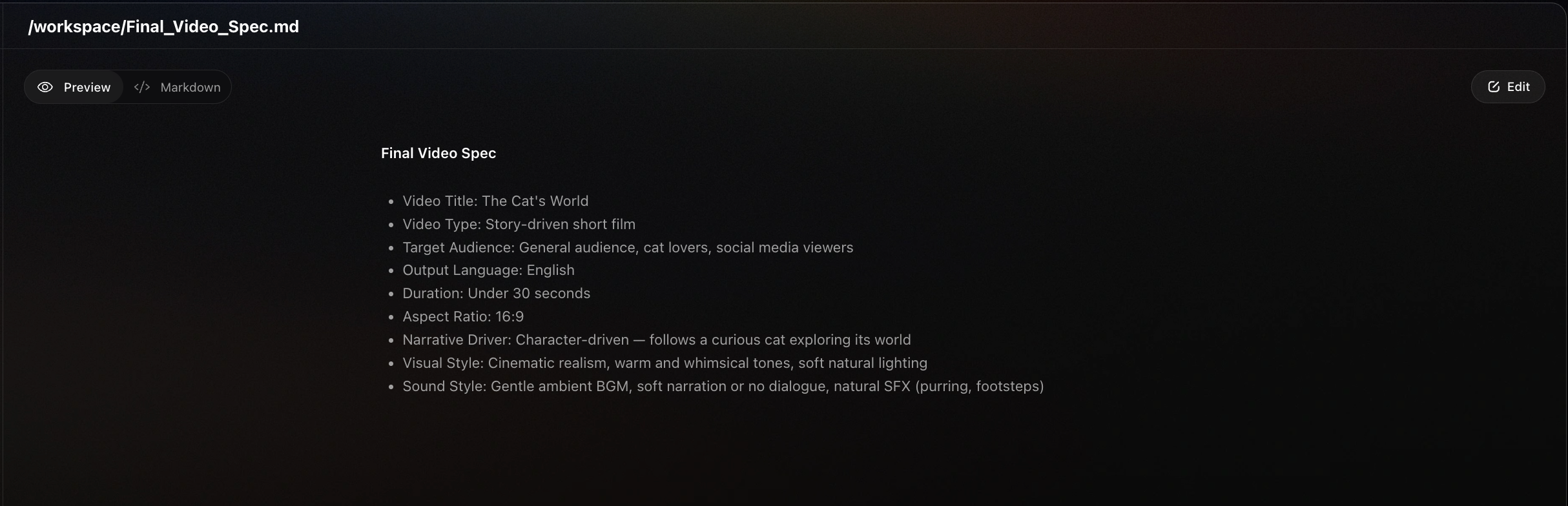
The official workflow includes the compilation of "Final Video Specifications", which is not mentioned in the above table. This section stores information about video title, type, aspect ratio, duration, visual style, language, model preference , etc. basic generation information to ensure that throughout the entire generation process, the generation of video creatives is accurate and error-free . Therefore, when writing the workflow, this tool needs to be added before storyboard creation, but it does not exist when writing other sections of the skill.
⬇️Dear directors, if you have a clear description of the visual style, you can write it here~⬇️
⚠️ Note that the </> format is standardized:
When editing a Skill in Markdown format (you may choose to have AI handle this step), you need to ensure the accuracy of the format; otherwise, the content of this section will become invalid.
- Partition titles must be listed in the above table;
- The format of the partition must be strictly written according to the template, for example: starting with <planner> and ending with </planner> respectively;
✨ How much time and effort can this skill save you?
As a professional creator, you have your own exclusive workflow and aesthetic standards . The greatest value of Skill System is "to transform your professional experience into assets" :
- Completely bid farewell to the "one-size-fits-all" AI flavor: The default aesthetics of AI are often mediocre and unstable. Through Skill, you can "teach" it your exclusive lighting, camera language, and color preferences, achieving "a thousand faces for a thousand people."
- Precipitate your exclusive SOP (which can be reused repeatedly): For example, the processes for oral endorsements, car advertisements, and MVs are completely different. As long as you fine-tune a "Car Advertisement Skill", you can directly apply it to similar projects in the future without having to start from scratch each time.
- Extremely flexible, start wherever you want: You don't have to follow the full process of "writing a script -> creating images -> animating". If you already have images generated by Midjourney, your process can start directly from "animating".
- Fill in the professional blind spots of AI: Does AI not understand your company's jargon or your customers' taboos? Write them into Skill, and it will become your dedicated long-time employee.
🛠️ How to rewrite your exclusive Skill?
If you want to fine-tune it yourself, here are the writing suggestions for each partition:
‘Process Planning’: Determines the process by which the Agent calls tools (coordinates the work sequence of various departments)
Many creators felt that the previous default process of FlovaAI was too rigid, wasting a lot of time. In fact, it all depends on <Process Planning> to decide.
<Process Planning> needs to concisely and clearly explain the purpose of the tool , without going into details about specific practices here . Suggested content to include:
- Clearly describe the creative process:
- You can develop a complete creative process:"Step 1: Write video specifications -> Step 2: Write storyboards -> Step 3: Generate images -> Step 4: Generate videos -> Step 5: Edit and synthesize"
- Single-point direct access can also be requested: "Step 1: Generate video -> Step 2: Edit and synthesize"; "Step 1: Generate music, no need for pause and confirmation"
- Order and dependency relationships before and after the tag:
- For example, for video generation that requires audio drivers (such as lip-syncing in music MVs), it is necessary to clarify that the audio must be prepared before video generation, and audio is a necessary creative for video generation and cannot be skipped.
‘Asset Analysis’: Tell the MultiModal Machine Learning model your requirements
This MultiModal Machine Learning analysis model is only used to process the files you uploaded , currently including: videos, images, audio, and documents. You can include your understanding of the creatives or the criteria for splitting them.
For example:
- I need tools to analyze my script without altering its content or rhythm;
- I need tools to disassemble the video I uploaded, but the rhythm and duration of the video storyboard disassembly must comply with the specifications (as follows);
‘Storyboard Design’: Let AI shoot according to your "director's vision" instead of generating randomly
You need to provide separate work requirements tocharacter designers,storyboard planners,audio designers,editors, respectively:
- How should the "key elements" be planned?
- Subject: Character (what it looks like, whether there are different looks), Character's voice tone, etc.;
- Scene: Whether it is necessary to explain the spatial structure and key positions;
- Key Item
- ......
- How should the "video storyboard" be planned? (Videos of different genres have different requirements)
- Shot language:15-second long shot with multiple cut shots, 6-10 second flat narrative shots, etc.;
- Shot description: It should include characters, scenes, story content, how characters interact, etc.;
- ......
- How should "voice" be planned?
- Background music:One or more pieces, whether to switch according to rhythm, etc.;
- Narrator/Voiceover: Whether a narrator is needed, what the rules are, etc.;
- ......
⚠️ Note the "role": The "video storyboard planner" is only responsible for script and shot planning, and there is no need to write out the generation details here; only the "shooting plan" needs to be formulated.
‘Media Generation’: Determine the generative model and reference content specifications
Different projects require different capabilities. Do you want ultimate coherence? Or the strongest single-frame image quality?
Clearly state here: which model to use for images (e.g., Gemini), and which for videos (e.g., Seedance 2.0). You can also enforce the following rule: " All subsequent shots must refer to the character image of the first shot to ensure consistent appearance. "
⚠️ Note: The limitations of the reference capabilities and resolution supported by the model depend on the requirements of the model's official API interface. Please refer to the official interface information of the model. If you choose not to specify information such as the model and resolution, Flova will help you match the default most suitable option;
List of Flova AI Visual Generation Tools and Models:
| Official Tool Name | Chinese explanation | List of Supported Models |
|---|---|---|
TextToImage | Text-to-Image | Seedream 4.5, Nano Banana Pro(Gemini 3 Pro Image). Nano Banana 2(Gemini 3.1 Flash Image). Midjourney V7. GPT Image 1.5. Flux.1 Kontext Pro |
ImageToImage | Image-to-Image | Seedream 4.5. Nano Banana Pro(Gemini 3 Pro Image), Nano Banana 2(Gemini 3.1 Flash Image), Midjourney V7, GPT Image 1.5, Flux.1 Kontext Pro |
MultiModalToVideo | Omnipotent Reference (MultiModal Machine Learning Video) | Seedance 2.0, Seedance 2.0 Fast· |
ImagesToVideo | MultiModal Machine Learning Video (Multiple Images to Video) | Kling 3.0 Omni, Vidu(Q2) |
FirstFrameToVideo | First Frame Generated Video | Google Veo3.1 Fast, Sora-2, Sora-2-Pro, Wan2.6, Vidu(Q3-Pro), Seedance 1.5 Pro Audio, Grok Imagine Video, Kling 3.0 Audio, MiniMax Hailuo 2.3 |
VideoInterp | Generate video from start and end frames | Google Veo3.1 Fast, Seedance 1.5 Pro Audio, Kling 3.0 Audio, Vidu(Q3-Pro), MiniMax Hailuo 2.3 |
TextToVideo | Text-to-Video | Google Veo3.1 Fast, Sora-2, Wan2.6, Sora-2-Pro, Kling 3.0 Audio, Seedance 1.5 Pro Audio, Seedance 2.0, Seedance 2.0 Fast |
ImageToVideoByAudio | Audio-driven Video Generation | OmniHuman1.5 |
lyrics_to_song | Music Generation | Suno 5, Mureka 8 |
text to narrtion | Narrator Generation | ElevenLabs v3, Doubao |
‘Prompt Writing’: Personalized Aesthetic Injection
This is where the texture of the picture is determined . Don't just write "good-looking pictures", but input your picture effects , shot language , especially experience with different models , etc. professional knowledge :
- Specify separately the writing method of prompt for image generation , video generation
- Prompt Writing Structure: e.g., Style (technical term) + Content (natural language) + Shot Language (technical term) + Emotional Word;
- Shot language: Specifies the use of
Over-the-shoulder shot(over-the-shoulder shot),Dutch angle(tilted composition); - Light and Color: Write
deep teal-cyan shadows dominating 90%, zero warm fill(90% deep teal-cyan shadows, zero warm fill light); - etc. ......
- Set negative prompt words: Clearly write "no subtitles" and "no music" to facilitate post-production editing.
- Some models require specific formats. You can consult the official assistant or refer to the official API interface documentation of the model to ensure stable generation. For example:When referencing a reference image in the Kling 3.0 Omni model, the prompt must use the <<<image 1>>> format; otherwise, the reference will fail.
‘Video Editing’: What should be noted in video editing?
Basic editing capabilities supported by Flova AI: volume adjustment, track muting, audio and video speed change, etc. You can summarize the issues encountered during the creative process into specifications and write them here to prevent the AI from making the same mistakes next time.
For example:
- When using a digital human for lip-syncing, the speed of the lip-syncing video cannot be changed;
- When creating music MV content, the editor needs to mute all video tracks and keep only the BGM audio unmuted to avoid duplicate audio tracks.
- ......
🔥 Frequently Asked Questions (FAQ) —— Your Guide to Avoiding Pitfalls
Q1: Why has the performance of the model suddenly deteriorated, completely different from the previous two days?!
🧠 Unveiling the Underlying Logic:
Many creators are unaware that the generation of large models has the problem of "Data Domain Shift", and different models have their own strengths in style and effects. The effects of prompts for realistic styles and science fiction themes vary significantly across different models.
✅ How to Improve:
You can "refine" the professional knowledge of the image description for the model.
Enter the <Prompt Writing> section of Skill, describe your visual preferences using professional terms (such as film photography, pastel colors, rich details, light and shadow transitions, high contrast, rich layers, hazy aesthetics, light aesthetics, lomo effect, etc.). Or in <Media Generation>, enforce that each shot generation must include a reference image (matting image) that you are satisfied with to anchor the style.
Q2: I have a set of professional workflows for my own company, which are different from Flova's default ones. How can I modify them?
✅ How to modify:
Modify the <Process Planning> partition. You can completely rewrite the stage sequence. For example, if your rule is "narration voiceover must be produced first, and then the video is generated based on the narration time", you can specify in the Planner:1. Generate Audio -> 2. Analyze Audio length -> 3. Generate Video of corresponding length.
Q3: If a creative (image or video) generated by AI is not visually appealing, how can it be remedied?
✅ How to modify:
When you encounter poor creatives, simply ask it to redraw directly in the dialog box ("The lighting in shot 3 is too dim, redo this shot"). You can also temporarily add a specific requirement in the project's Final_Video_Spec.md (Final Specification Sheet), which will override the default settings of Skill.
Q4: The process is too cumbersome! I just want to make an image move, not go through all this nonsense like writing a script and storyboard!
✅ How to modify:
- The new version of Flova can support directly generating single creatives or individually optimizing prompts without loading any Skills;
- When you have more than one tool call or clearly have experience in prompt writing, you can streamline
<planner>! Create a new lightweight Skill and directly delete unused sections such as<Storyboard Design>.
Q5: What should I do if AI always misunderstands my knowledge in a certain professional field (such as a specific medical device or special camera position term)?
✅ How to modify it:
Create a "Terminology Glossary" for it in <Storyboard Design> or <Prompt Writing>. For example, write: "Note: When I mention 『push shot』, please translate it to 『Slow dolly shot in』 in the prompt, and the use of zoom is strictly prohibited". Feed it with professional knowledge, and it will no longer be an amateur.
Q6: What should I do if the model I want to use (such as a specific anime model) is not included in the official Skill recommendations?
✅ How to change:
Just specify the name and resolution of the model you want to call in the <media_generator> partition (see the list above). As long as it is a model pool supported by the platform, you can freely switch. The model Flova I want to use is not available? Welcome to submit your favorite models to the official customer service!
Q7: The official default Skill has too many words. I can't understand them and don't want to read them. What should I do?
✅ How to modify:
We recommend that you choose a Skill that is closest to your workflow and make local modifications based on the official Skill. If you have any questions or encounter issues where the Skill does not work, feel free to share them in the official user group, and our professional team will answer your questions.
In the future, Flova will plan to launch an AI tool specifically designed to assist with Skill writing. Simply upload your past workflow experience, and Flova will help you convert it into a Skill document. During the internal testing phase, you can also share your experience of converting workflows into Skills with us to help us launch a more professional Skill tool Agent!
💬 Haven't answered your questions yet?
Feel free to contact the official operations team to join the group, bring your work link and questions, and communicate with more frontline creators about your ownAI-era director's insights!
The above is just the basic writing of Flova AI's official default workflow, intended to serve as a starting point. We look forward to all creators incorporating your aesthetics and professional knowledge into Skills to create and unlock more incredible exclusive gameplay!
Last updated on